

UV printing can add full-color graphics, white ink and selected varnish effects directly to phone case blanks. However, not every phone case material produces the same result. Two cases that look nearly identical may use different plastics, surface coatings or release agents, causing significant differences in ink adhesion.
Before choosing a compact UV printer for custom phone cases, manufacturers should first understand which case materials they intend to print and how those materials should be tested.
This guide explains the main types of phone case blanks, their UV-printing considerations and the checks that should be completed before batch production.
Can a UV Printer Print Directly on Phone Cases?
A UV flatbed printer can print directly on many phone cases when the printable surface is sufficiently flat, the case can be held securely and the ink has acceptable adhesion to the actual material or coating.
UV ink is cured by UV LED light during printing, so the printed case can normally proceed to inspection without a separate heat-transfer process. Depending on the blank, the printer can apply:
- Full-color CMYK graphics
- White ink beneath colors
- White design elements
- Selected varnish effects
- Names, numbers and variable artwork
However, “printable plastic” is not a sufficient material specification. The phone case supplier should identify the case material and any surface coating whenever possible.
Polycarbonate Phone Cases
Polycarbonate, commonly abbreviated as PC, is frequently used for rigid or semi-rigid phone case shells. Its dimensional stability can make it easier to position on a flatbed printer than a highly flexible case.
Rigid PC cases are often suitable for custom graphics because the printable back remains relatively flat during production. They can also be placed in a fixture or detected through a compatible visual-positioning workflow.
Nevertheless, adhesion can vary between PC blanks. Some cases have a decorative, scratch-resistant or soft-touch coating that changes the surface behavior. A print test should therefore be performed on the actual batch rather than on an uncoated sample from a different supplier.
TPU Phone Cases
Thermoplastic polyurethane, or TPU, is commonly used for flexible phone cases. Its flexibility helps protect the phone, but it also introduces additional printing considerations.
A flexible case may bend during loading, printing or removal. If the printed ink layer is less flexible than the case, heavy bending can contribute to cracking or edge separation. The case must also remain sufficiently flat so that the distance between the printhead and the surface stays controlled.
When evaluating TPU cases, check:
- Whether the blank lies flat without lifting at the corners
- Whether a supporting insert is needed
- Whether the case moves during printing
- Whether the ink remains attached after moderate bending
- Whether the material contains surface residues from manufacturing
TPU should not automatically be treated as unsuitable, but it normally requires more careful testing than a rigid case.
PC and TPU Hybrid Phone Cases
Many protective cases combine a rigid PC back with a flexible TPU frame. This construction can provide a relatively stable central printing area while retaining flexible edges.
For UV printing, the operator should determine exactly where the artwork will be placed. If the design remains on the rigid back, production may be relatively straightforward. If the artwork extends across the flexible frame, adhesion and bending behavior must be tested separately.
Raised bumpers, protective corners and uneven borders can also affect printhead clearance. The printable area should be mapped before preparing the final artwork.
Transparent Phone Cases
Transparent cases require more than simply sending a color image to the printer. Process colors are not fully opaque, so artwork printed without white ink may appear translucent or lose contrast when the phone is installed.
White ink can be used in several ways:
- As an underbase beneath the color image
- Behind selected areas that need stronger opacity
- As a standalone design element
- As part of a layered print effect
The artwork file should define which areas receive white ink. A full white underbase produces a different appearance from selective white printing, so the customer should approve a physical sample before the complete order is produced.
Operators should also check whether the transparent blank has a protective film. Printing on the film instead of the actual case surface will result in an unusable product once the film is removed.
Dark and Colored Phone Cases
Colors printed directly on black, dark blue or other dark cases may be affected by the color of the substrate. A white ink layer is commonly used to create a more neutral base for the CMYK image.
The amount and placement of white ink depend on the required appearance. For example, a full-color photograph may need a complete white underbase, while a design intended to interact with the case color may use white ink only in selected areas.
Colored cases should be tested individually. The same artwork can look noticeably different on black, red, blue and pastel blanks even when the same print settings are used.
Silicone and Soft-Touch Cases
Silicone and soft-touch materials can be challenging for direct UV printing. Their surfaces may have low surface energy, significant flexibility or additives that interfere with ink adhesion.
Some cases described as “silicone” are actually TPU or another elastomer, while others use a silicone-like coating over a rigid structure. Product names alone are therefore not enough to determine printability.
If silicone or soft-touch cases are part of the planned product range, send representative samples for testing. Cleaning, pretreatment or a suitable primer may be required, but no treatment should be selected without evaluating the actual material.
Leather, PU Leather and Fabric-Covered Cases
Wallet-style and decorative phone cases may use genuine leather, PU leather, coated fabric or laminated surfaces. These materials are not equivalent.
Natural leather can vary in texture, absorbency and surface treatment. PU leather may have a coating that accepts ink differently from an uncoated textile. Deep grain and stitching can also prevent the printhead from maintaining a consistent distance across the design.
Before printing this type of case, evaluate:
- Surface texture and height variation
- Ink adhesion to the finish or coating
- Color appearance on the underlying material
- Whether the case can remain fully open and level
- Whether seams, magnets or raised parts affect clearance
A physical sample is essential when the material construction is uncertain.
Why the Coating Can Matter More Than the Base Material
The outermost surface is what receives the ink. A PC case with a rubberized coating may behave differently from bare PC. Likewise, two TPU cases produced with different additives may produce different adhesion results.
Possible surface variables include:
- Soft-touch coatings
- Anti-fingerprint finishes
- Release agents remaining from molding
- Protective films
- Painted or metallic finishes
- Scratch-resistant coatings
- Oil, dust or handling contamination
This is why AndresJet recommends testing the real production blank instead of relying only on a general material name.
How to Test a Phone Case Before Batch Printing
A practical phone case sample test should reproduce the intended production process as closely as possible.
- Confirm the blank: Record the supplier, model, material, color and coating.
- Inspect the surface: Check for protective film, dust, oil, molding residue and scratches.
- Clean consistently: Use a cleaning method appropriate for the actual material.
- Secure the case: Use a fixture, supporting insert or visual-positioning workflow as required.
- Print a representative design: Include fine text, solid color, gradients and white ink if these will appear in production.
- Allow the sample to stabilize: Do not judge only by its appearance immediately after printing.
- Test adhesion: Check edges, solid areas and any portions likely to experience handling.
- Test normal use: Install and remove the case and assess reasonable flexing or contact points.
- Approve a reference sample: Keep an approved sample and its print settings for the production order.
If the supplier changes the material, coating or manufacturing process, the blank should be tested again.
Positioning Phone Cases on a UV Flatbed Printer
Phone case artwork must align with camera holes, outer edges and other physical features. A small alignment error can be obvious, especially when the design uses a border or follows the shape of the case.
Repeat orders with identical case models can be produced with a fixture that places each blank in a known position. Mixed case models or variable placement may benefit from a compatible camera-assisted workflow.
The AndresJet AJ1206 small UV flatbed printer offers an optional wide-beam CCD scanning camera for visual positioning. Its 1200 × 600 mm printing area can accommodate multiple small items, while white ink and varnish configurations support different phone case design requirements.
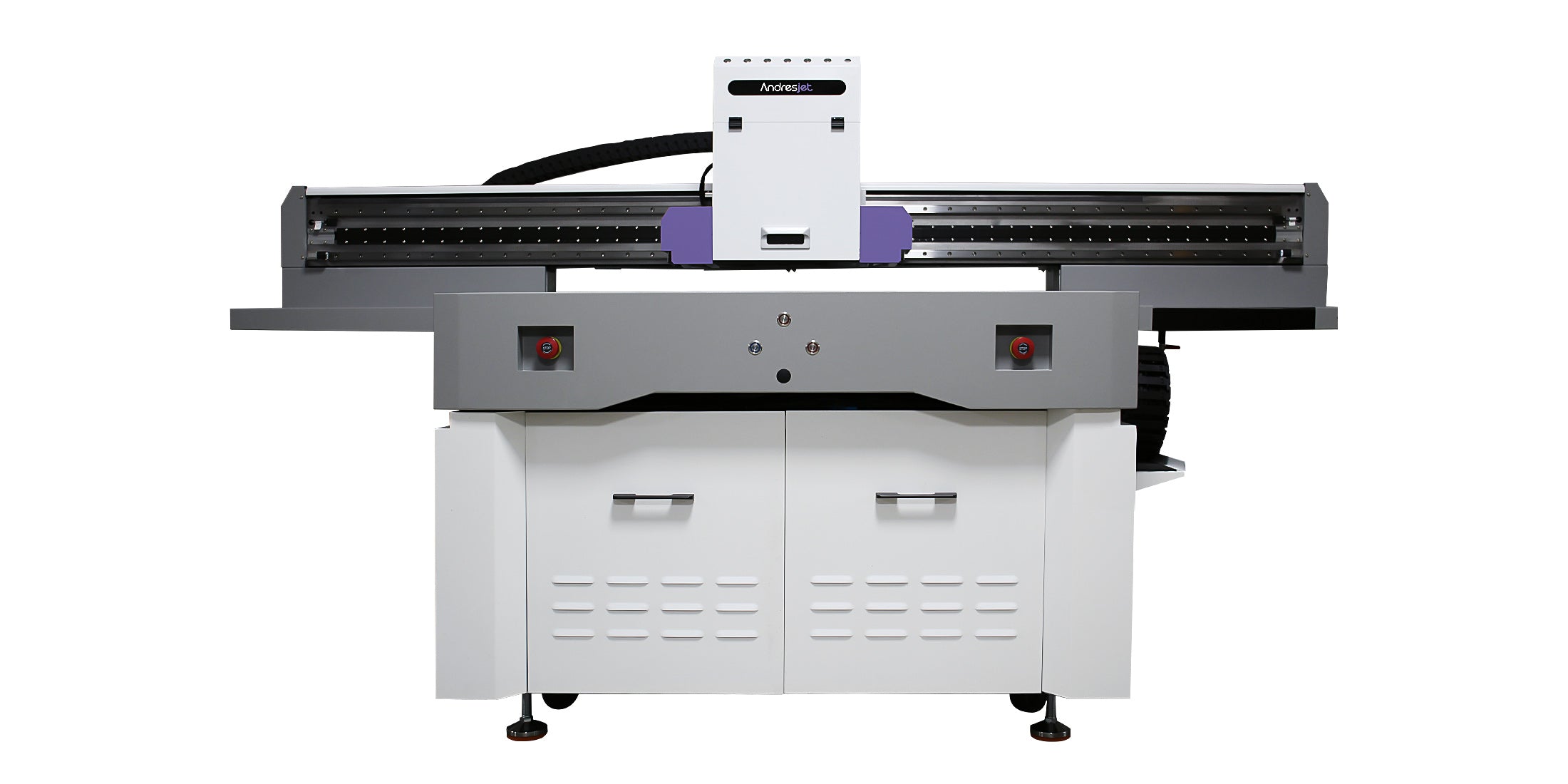
Whether a fixture or CCD positioning is more appropriate depends on the number of case models, the order quantity, the frequency of product changes and the required registration accuracy.
Do Not Approve a Material Based Only on One Successful Print
A print that looks acceptable immediately after production has not necessarily passed a complete material test. The sample should also be checked for handling resistance, edge adhesion, bending behavior and consistency between blanks.
For commercial orders, keep records of:
- Case supplier and batch
- Declared material and coating
- Cleaning or pretreatment method
- White ink and color settings
- Fixture or positioning method
- Approved artwork version
- Inspection results
These records make it easier to repeat a successful job and investigate changes if a later batch performs differently.
Choosing a UV Printer for Custom Phone Cases
Rigid PC, flexible TPU, hybrid cases and selected coated cases may all be candidates for UV printing, but their production requirements are not identical. The case structure, outer coating, flexibility and surface cleanliness can be just as important as the material name.
Before purchasing equipment or accepting a large order, submit representative phone case blanks for testing. Include transparent, dark, flexible and coated versions if they are part of the intended product range.
Explore AndresJet’s compact UV printers for custom phone cases, or provide the case material, dimensions, photographs and expected order quantity for application evaluation.
See AndresJet Printing Applications and Updates
Follow AndresJet’s official social media channels for UV printing demonstrations, equipment updates and additional application examples:
Share:
Flatbed vs. Cylinder UV Printing for Promotional Products
How Much Space and Power Does a Desktop-Class UV Printer Need?