

Desktop UV Flatbed Printer: Which Tier Fits Your Studio
- by John White
Start UV printing without the floor space — compact flatbed printers built for small shops.

Desktop is a size class, not a warranty. The phrase describes a small-format flatbed that fits a workroom, and the machines sold under that name range from a bench device to a floor-standing compact industrial platform. Choosing between them is a question about the work and the site rather than about the badge.
This guide sets out how to decide which tier fits: what the published tiers actually differ in, what a studio should check before buying, the media, thickness and weight limits that govern the work, the space and power the machine commits to, how to estimate output honestly, the support a small operation needs, and when it is time to step up.
A small-format flatbed built for a studio bench.
It is sized for a workroom rather than a production floor, and the published tiers in this range place the compact industrial platforms above that class in weight, power and support demand.
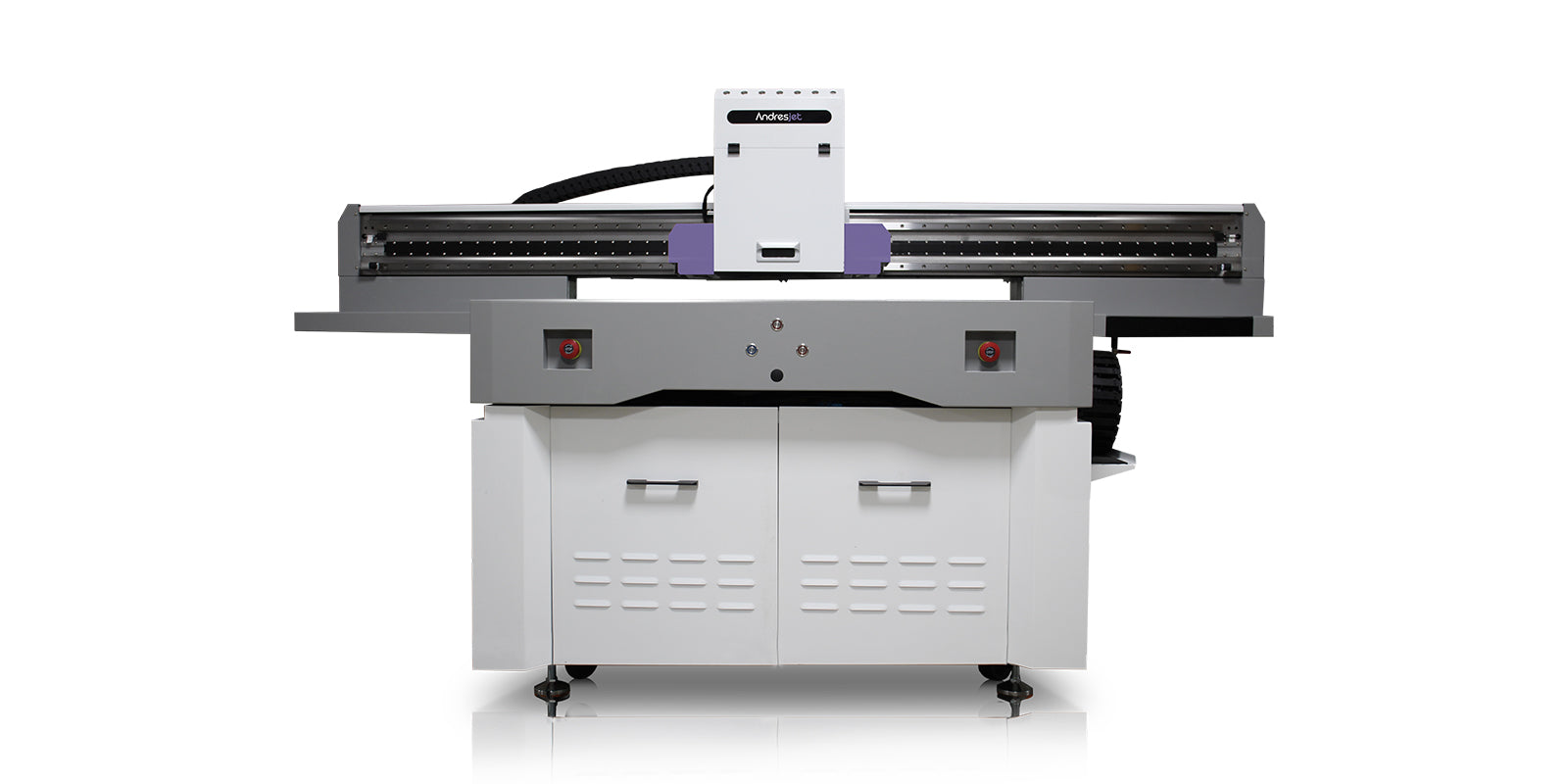
The distinction matters because the word desktop is used loosely. The published answer for the compact platform in this range is that it is not a desktop printer at all: it is described as a floor-standing production system with a published net weight of 400 kilograms and an AC 220V electrical supply, requiring installation planning, trained operation, routine ink-system care and a defined production area. A buyer who expects to lift it onto a bench will be surprised by the delivery.
So the useful question is not whether a machine is called desktop, but what tier it belongs to. The published range separates compact flatbed platforms, a digital cylinder platform for cylindrical and tapered work, and wide-format platforms for larger panels, and each tier carries its own bed, weight and support profile.

In weight, power, media limits and support.
The compact industrial platform in this range is published at 400 kilograms net weight with an AC 220V supply and a 1200 by 600 millimetre print area.
| Attribute | Compact industrial platform (AJ1206) |
|---|---|
| Maximum print area | 1200 by 600 millimetres |
| Media thickness | 0 to 35 millimetres |
| Maximum media weight | 36 kilograms |
| Ink configuration | CMYK plus white plus varnish, expandable to eight colours |
| Positioning option | Optional wide-beam CCD scanning camera |
| Electrical supply | AC 220V, 50/60Hz |
| Net weight | 400 kilograms |
The pattern is that the tier is defined by what it commits you to rather than by what it prints. A heavier machine needs a floor, a power supply and an access route. A wider bed needs a larger production area and more handling space. A higher head count needs a bigger consumables and service plan. Those commitments are what the buyer is really choosing between.
The part, the mix, the site and the support.
The published approach is to match the printer to the order mix: products and materials, order pattern, required print result and workshop and support needs, rather than to a headline speed figure.
The published enquiry list for the compact platform asks for four groups: representative samples or photos with dimensions, thickness, weight, surface finish and material type; the order pattern including typical batch size, number of artwork variations and turnaround; the required print result including coverage, resolution, white and varnish layers and viewing conditions; and the workshop and support needs including installation country, space, power and operator experience.
That list is a useful checklist whatever tier is being considered, because it separates the work from the machine. A studio that cannot answer the order pattern question is not yet ready to choose a tier, and a studio that can answer it usually finds the choice has already made itself.
Print area, thickness and maximum part weight.
The published limits for the compact platform are a 1200 by 600 millimetre print area, 0 to 35 millimetres of media thickness and a maximum media weight of 36 kilograms.
Those three figures describe a box rather than a line, and a part has to sit inside all of them. A part that fits the width and the length can still fail on thickness or on mass, and the published guidance is that a listed material is not automatically production-ready: surface condition, pretreatment, fixture strategy, ink adhesion and required durability all have to be confirmed with representative parts.
The ink configuration belongs in the same comparison. The compact platform is published with CMYK, white and varnish and can be expanded to eight colours including light cyan, light magenta and light black, with a published resolution up to 300 by 2400 DPI and TOSHIBA CE4M printheads. A studio whose work needs a white underbase or a varnish effect is choosing a configuration, not only a bed size.
A production area with the right supply.
The published position is that the compact platform is a floor-standing industrial machine with an AC 220V supply, so it needs a defined production area rather than an office desk.
Three site questions follow from the published figures. The floor, because 400 kilograms of machine plus material needs a surface that will take it. The supply, because AC 220V at 50 or 60 hertz has to be available where the machine will sit, and the published operating range of 20 to 30 degrees Celsius and 40 to 60 percent relative humidity has to be maintained for consistent ink behaviour. And the access, because the machine arrives as a crate and has to reach its position.
The published packing data helps plan the move. The compact platform is published with a packing crate of roughly 275 by 129 by 165 centimetres and a gross weight of 520 kilograms, which tells the buyer what has to fit through the door and what equipment the unloading will need.
By timing a whole batch, not the print.
Output depends on loading, positioning, artwork changes, resolution, passes, coverage, curing, unloading and inspection, so the published guidance is to time a complete representative batch.
The published caution is specific: the compact platform is quoted at up to 2,000 coins per hour, and that figure describes one coin workflow rather than the platform in general. A studio that applies a headline figure to its own product will overstate what it can ship, which is the gap that turns a busy line into a late one.
The practical method is to time a real batch from the first part inspection to the last inspected piece, including one changeover, and then divide the usable hours by that figure. The same method covers all three tiers, which makes it the honest way to compare them: the machine that finishes the real batch fastest, not the one with the largest number on the sheet.
Remote diagnosis, parts and training.
Support in this range is published at a 3-hour response around the clock, with more than 80 percent of issues resolved remotely, 8 years of parts availability and training included.
A studio without an engineer on site depends on that model more than a factory does. The published commitments are a 3-hour response, remote resolution of more than 80 percent of issues, guaranteed spare parts availability for 8 years, and 3 days of training with on-site application support on the cylinder platform. The published delivery position is roughly 10 days from order confirmation to ready shipment.
Two practical checks follow. Ask what is excluded from the warranty, because the published position excludes ink, tubes, filters and printheads and the studio has to budget for them. And ask how the first week of production will be supported, because the published training is what turns a delivery into an operating machine. The practical questions a new operation faces are covered in the guide to finding B2B customers for UV printing.
When the part size or the queue outgrows it.
Step up when the largest part, the media weight or the throughput exceeds the published limits of the tier, or when the order mix needs a bed and a speed the smaller platform cannot deliver.
The signals are specific rather than a matter of ambition. A part that no longer fits the 1200 by 600 millimetre bed. A panel that exceeds 36 kilograms. A queue that cannot be cleared in the working week even after the batch timing is optimised. Or an application that needs a cylindrical platform rather than a flatbed, such as bottles and tapered containers.
Before stepping up, two conditions should be met. The current tier should be running at its real capacity rather than its theoretical one, which is what the batch timing establishes. And the site should be able to accept the next tier, because the wider platforms in this range are published at around 1,850 kilograms net weight and machine dimensions that reach more than five metres on the largest model, with a packing crate to match. The shop itself is covered in the guide to shop layout, power and ventilation.
Three published references support the decision once the tier is chosen. The operating environment of 20 to 30 degrees Celsius and 40 to 60 percent relative humidity, which the site has to hold. The ink cost of roughly 0.80 to 1.20 US dollars per square metre, which turns the print into a cost per unit. And the colour workflow, which rests on ICC-based profiles (International Color Consortium) and process standards published by bodies in the field (Fogra, PRINTING United Alliance). Occupational guidance for a small print workshop is published by the relevant authority (HSE printing), product safety certification is handled by recognised bodies (UL), and export and import requirements are summarised by trade.gov.
What is a desktop UV flatbed printer?
It is a small-format flatbed sized for a workroom rather than a production floor. The published tiers in this range place the compact industrial platforms above that class in weight, power, loading control and support requirement, so the name describes a size class rather than a machine type.
How does a desktop tier differ from a compact industrial one?
In weight, power, media limits and support demands. The compact platform in this range is published as a floor-standing production system with a net weight of 400 kilograms and an AC 220V supply, which is already a different site and support requirement from a bench machine.
What should a studio check before buying?
The published approach is to match the printer to the order mix: the products and materials, the typical batch and artwork count, the required print result, and the workshop and support needs. A headline speed figure answers none of those questions.
How do you estimate realistic output?
By timing a complete representative batch. Loading, positioning, artwork changes, resolution, passes, coverage, curing, unloading and inspection all sit inside the real cycle, so the published guidance is to time the batch rather than to apply a headline figure.
When should a studio step up a tier?
When the largest part, the media weight or the throughput exceeds the published limits of the current tier, or when the order mix needs a bed and a speed the smaller platform cannot deliver without turning work away.
Choose the tier by the work and the site, not the label. Check the order mix, read the published bed, thickness and weight limits together, confirm the space, the power and the access, and time a real batch before comparing output.
The published limits and support commitments for the compact tier are set out on the small-format collection and the AJ1206 page, and the surrounding decisions are covered in the guides to finding B2B customers and shop layout, power and ventilation.
Send us your product list, typical batch size and the space you have. We will tell you which tier fits, what it commits you to, and what to test before you commit.
Compare the tiers