A question? Visit our contact page

Adjusting print heads in a UV flatbed printer is one of the most critical maintenance tasks that directly affects color accuracy, registration, print sharpness, and overall production quality. Whether you’re running small custom jobs or full-scale production runs, proper head calibration ensures your printer delivers professional results consistently. Understanding how to adjust print heads, recognize alignment issues, and maintain the correct head height can eliminate common printing errors such as banding, color misregistration, or blurred images.

Understanding Print Head Calibration in UV Flatbed Printers

Print head adjustment in a UV flatbed printer involves fine-tuning the positioning, height, angle, and alignment of each nozzle array relative to the printing bed and material surface. UV flatbed technology uses precision inkjet heads designed to deliver UV-curable inks at micron-level tolerances. Even the slightest deviation can lead to uneven curing or visible print lines. Proper calibration typically includes four steps: mechanical alignment, nozzle alignment, ink flow optimization, and firmware-based electronic adjustment. The goal is to synchronize all heads perfectly so ink droplets land exactly where the software intends.

Step-by-Step Print Head Adjustment Process

First, set the table level correctly. The print bed must be flat within the manufacturer’s specified tolerance range because even slight unevenness causes print heads to hit the surface or leave inconsistent gaps. Next, use the printer’s built-in calibration utility to conduct a test print. Examine the printed pattern for overlapping lines, color shifts, or missing gaps. Adjust X-axis and Y-axis head positions using the control software or manual screws, depending on your printer model. Once alignment looks uniform, adjust the head height to match material thickness, ensuring no physical contact occurs.

If your UV printer includes automatic head calibration sensors, activate them to perform micro-adjustments digitally. For machines without this feature, use feeler gauges to verify the head-to-media distance, usually between 1.0–2.5 mm depending on substrate type. Always confirm nozzle firing consistency by printing a full-dot test; clean or flush nozzles if streaks appear. Finalize by recalibrating the white ink layer and varnish channels for precise dot placement and layering accuracy.

Core Technology Behind UV Flatbed Precision

Modern UV flatbed printers use piezoelectric print heads designed for variable dot control, enabling seamless gradients and sharp fine detail. Each print head contains thousands of nozzles, with droplet sizes often ranging from 3 to 14 picoliters. Print head adjustment affects more than alignment alone—it impacts ink curing, optical density, and adhesion. When UV inks are jetted precisely and cured instantly under LED lamps, prints gain superior scratch resistance and color stability. Advanced firmware algorithms further compensate for head drift, temperature changes, and viscosity variations, ensuring consistent performance across long production cycles.

The global UV flatbed printer market continues to expand, driven by demand for versatile, high-resolution direct-to-substrate printing. According to industry data from 2025, the sector is projected to exceed 1.8 billion USD by 2027, fueled by growth in interior decoration printing, personalized packaging, and signage production. Inline print head alignment and automated height sensing systems are becoming standard among leading models, minimizing manual intervention and maximizing throughput for print businesses.

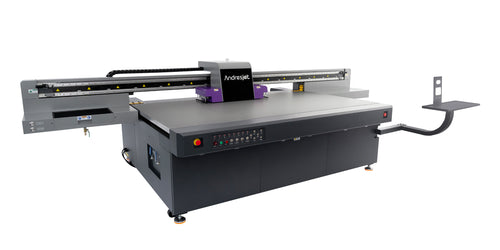
AndresJet is a premier provider of cutting-edge industrial digital printing solutions, catering to the unique needs of our diverse clientele. With a strong emphasis on personalized customer service, its skilled engineers offer efficient solutions in home decoration, plastic product printing, gift printing, and sign printing, tailoring each approach to meet customer requirements.

Top Products and Alignment Features

Printer Model Key Advantages Ratings Best Use Cases
Roland IU-1000F High precision nozzle alignment, auto-height detection 9.6/10 Acrylics, signage panels
Mimaki JFX600 Five-layer printing, fast calibration 9.4/10 Glass, backlit film
Mutoh PerformanceJet Proprietary nozzle mapping system, reduced banding 9.2/10 Wood, leather
Canon Arizona 2380 Auto head leveling, UV LED curing 9.1/10 Foam board, corrugated plastic


Competitor Comparison

Feature Automatic Calibration Heated Bed Multi-Layer Printing Live Alignment Preview
Model A Yes Yes Yes Yes
Model B Partial No Yes No
Model C Yes Yes No Yes


These specifications show how fine-tuned print head technologies dominate the mid- to high-end UV flatbed printer market. Automated systems not only align print heads but continually monitor output accuracy, preventing micro-misalignment during long production runs.

Real User Cases and ROI

Print shops that consistently calibrate their print heads report notable returns in ink savings and reduced maintenance downtime. For example, a signage company in Texas recalibrated its UV flatbed printer with improved head alignment and achieved a 20% reduction in ink waste while cutting print rejects by 35%. These efficiency gains translate to higher margins and improved client trust through consistent quality. Fine-tuned head positioning also extends equipment lifespan, as minimized head crashes prevent permanent nozzle blockages.

Common Issues and Troubleshooting During Print Head Adjustment

When adjusting UV print heads, avoid overtightening alignment screws or altering head height beyond safe clearances. Sudden nozzle blockages typically result from improper ink pressure or air trapped in ink lines. Regular purging, head cleaning, and environmental control (temperature and humidity) stabilize print consistency. If persistent misalignment occurs, inspect the mechanical rails and carriage belts for wear—mechanical looseness often amplifies alignment drift over time.

Emerging UV printer technologies emphasize self-learning calibration systems powered by embedded sensors and machine learning algorithms. These systems can automatically detect, correct, and memorize optimal head positions for various materials. In the coming years, we can expect UV flatbed printers to integrate fully closed-loop calibration mechanisms that adapt dynamically to environmental changes. This evolution will empower print operators to run long unattended print batches with minimal manual input while maintaining perfect registration and curing balance.

Final Takeaway

Mastering print head adjustment in UV flatbed printers ensures every detail of your artwork transfers flawlessly to the substrate. Precision alignment translates to consistent color fidelity, crisp edges, and optimal ink adhesion—vital qualities for professional durability and customer satisfaction. By routinely checking alignment and following manufacturer calibration protocols, businesses can achieve lasting quality, reduced maintenance costs, and consistent performance across all materials.

Incorporating proper print head adjustment best practices doesn’t just improve print accuracy—it significantly extends the life of your equipment, safeguarding your investment for years to come.

FAQs

Q1: How do I know if my printhead height is incorrect?
A1: Signs include nozzle strikes, banding, streaks, or blurry prints caused by ink spreading or improper droplet placement.

Q2: Can automated printhead calibration replace manual adjustments completely?
A2: Automation reduces effort but manual fine-tuning is often necessary for ultimate precision.

Q3: How often should printhead alignment be checked?
A3: Ideally before each major print job or weekly to maintain print consistency.

Q4: Does AndresJet provide tools for printhead adjustment?
A4: Yes, AndresJet offers integrated software and hardware solutions designed for precise calibration.

Q5: Can environmental fluctuations affect printhead performance?
A5: Yes, stable temperature and humidity are vital for consistent ink flow and printhead longevity.

How often should print heads be adjusted in a UV flatbed printer?
Most manufacturers recommend recalibration every 100–150 printing hours or after any mechanical shock, material change, or head replacement.

What happens if the print head gap is too wide?
A large gap can cause blurred images, poor ink adhesion, and weak curing, especially when printing with thicker substrate coatings.

Does adjusting print heads affect white ink layers?
Yes, incorrect head positioning can cause white misalignment on multilayer jobs, resulting in ghosting or uneven opacity. Always recalibrate white ink channels following primary alignment.

Latest Stories

This section doesn’t currently include any content. Add content to this section using the sidebar.