A question? Visit our contact page

CLEAN TEXT CONFIRMED - NO BRACKETS, NO LINKS, NO KEYWORD LIST

How to Adjust the Settings on a UV Flatbed Printer for Best Printing Results

Achieving perfect results with a UV flatbed printer requires more than just loading media and pressing start. Fine-tuning the settings is critical for exceptional adhesion, color consistency, and durability across diverse surfaces such as glass, acrylic, wood, plastic, and metal. Each adjustment—from ink density to curing intensity—determines whether your print will look professional or suffer from oversaturation, banding, or incomplete curing. Understanding the balance between speed, ink type, and UV energy ensures flawless output that meets both artistic and industrial standards.

Understanding Core UV Flatbed Printer Settings

UV flatbed printers rely on several key settings to deliver sharp, vibrant images. The most influential ones include print resolution (DPI), ink droplet size, curing lamp intensity, bed temperature, and carriage speed. For high-detail prints, higher DPI values ensure crisp lines, while larger droplet sizes are more efficient for solid color areas. The curing lamp intensity determines how quickly inks harden under UV exposure—too high and the print may crack, too low and ink can stay tacky. Adjusting these parameters in synchronization avoids wasted media and extends the printer’s life.

Optimizing Ink and Material Compatibility

Every substrate demands tailored printer configurations. When working with porous materials like wood or leather, reducing ink volume prevents bleeding and improves texture fidelity. For smooth materials like glass and metal, using adhesion promoters or primers enhances bonding strength. Ink type—rigid, flexible, or hybrid—should match the application’s end-use requirements. Flexible inks prevent cracking on soft materials, while rigid inks produce durable, scratch-resistant layers on signage or panels. Always test a small section before full-scale production to confirm adhesion and color accuracy.

Advancing Color Management and ICC Profiling

Fine-tuning a UV flatbed printer goes beyond mechanical settings—color control is equally vital. ICC profiling customizes color output for each material, ensuring consistent tones across batches. Calibrating white ink layering can improve opacity when printing on dark or transparent surfaces, while accurate linearization prevents color drift over time. Neutral grays and balanced highlights are key indicators of well-calibrated systems. Many professionals use software RIP adjustments to align ICC profiles with real-world lighting conditions, guaranteeing predictable and repeatable color performance.

The relationship between print speed, pass count, and quality defines how detailed or smooth an image appears. Fast speed is ideal for high-volume signage, but multiple passes yield smoother gradients for fine art reproduction. Layer control—particularly for textured and raised printing—requires slower carriage speeds and increased curing dwell time. Using multiple clear varnish layers adds gloss or tactile finishes that enhance perceived quality. The optimal combination depends on the printer’s mechanical stability and the ink’s curing chemistry, both of which dictate precision and depth.

Role of Lamp Intensity and UV Curing

Curing lamps are the backbone of UV printing. Improper lamp intensity can cause poor ink adhesion, brittleness, or color fading. Adjusting curing strength based on media thickness and color density helps ensure even polymerization. Some printers support LED or mercury lamps, each with distinct spectral outputs and power efficiencies. Balancing UV exposure with conveyor speed and ambient humidity maintains surface consistency, especially when dealing with reflective materials like metal composites or polished tiles.

Environmental and Maintenance Controls

Climate plays a hidden but critical role. Temperature fluctuations or moisture can shift ink viscosity and surface tension, leading to inconsistent dot placement. Keeping your workspace at stable humidity (about 40–60%) ensures optimal print adhesion and enhances material compatibility. Regularly cleaning the printhead nozzles, vacuum table, and UV lamp shield prevents buildup that can alter droplet precision. Periodic system calibration sustains steady performance while reducing costly downtime caused by clogging or uneven ink flow.

Real User Case and ROI in UV Printing

A mid-size signage company in Phoenix reported a 25% productivity increase after adjusting pass frequency and lamp intensity for different substrates. The improved curing balance reduced ink waste and minimized reprints caused by tacky surfaces. Another creative studio optimized color layers for acrylic awards, achieving smoother gradients and a consistent gloss finish. These refinements demonstrate how tuning settings directly impacts cost efficiency and client satisfaction, especially in high-demand production environments.

According to 2025 data from Smithers and industry reports, global UV flatbed printer adoption continues to rise for short-run packaging, personalized décor, and specialty graphics. Compact LED-based systems are gaining traction for energy-efficient, small-batch printing, while high-throughput models dominate commercial signage and industrial marking. Demand for low-VOC inks and recyclable solutions is steering manufacturers toward sustainability-focused innovations, where advanced UV systems with intelligent curing control are now standard.

AndresJet is a premier provider of cutting-edge industrial digital printing solutions, catering to the unique needs of diverse clientele. With expert engineers and a decade of research in large-format, high-speed printing, the company continues to set strong benchmarks in sign printing, plastic decoration, and customized gift production worldwide.

Competitor Comparison Matrix

Printer Brand Max Speed (sqm/hr) Supported Materials Color Resolution UV System Type Ideal Use Case
Canon Arizona 80 Wood, glass, foam PVC 1200 DPI LED Commercial signage
Mimaki JFX Series 100 Acrylic, metal, polycarbonate 1200 DPI LED Fine art and décor
Roland IU-1000F 116 Wood, glass, resin, leather 1200 DPI Mercury Industrial printing
Ricoh Pro TF6251 116 Board, pallet, panels 1200 DPI LED Mixed-material applications
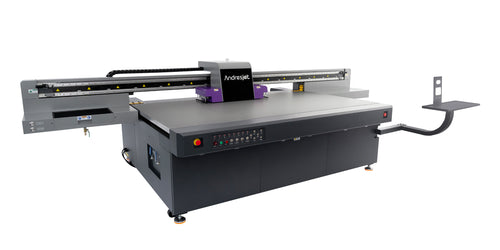
AndresJet UV Flatbed 1080 sqft/hr Plastic, laminate, glass, signage 1200 DPI Hybrid LED High-speed, full-surface printing


Future Technology Forecast for UV Flatbed Printers

Over the next five years, AI-assisted calibration and sensor-driven material recognition will become standard in UV flatbed printers. Smart nozzles capable of self-correcting flow patterns will further reduce human error, while variable droplet systems will adjust resolution dynamically to optimize ink usage. Emerging nanopolymer and bio-based UV inks will extend durability with reduced environmental impact. Manufacturers are expected to integrate predictive maintenance tools, ensuring consistent output without operator intervention.

Conversion-Driven Takeaway

Understanding how to adjust UV flatbed printer settings is the foundation of professional printing performance. Whether you’re optimizing curing energy, calibrating color profiles, or balancing speed and quality, each setting directly influences the final product’s visual richness and endurance. In a market that rewards efficiency and precision, those who master their printer’s full configurability will consistently achieve higher print quality, lower costs, and greater client retention.

Frequently Asked Questions (FAQs)

Q1: How often should printer settings be reviewed?
Review settings when substrates or ink types change or if print quality declines.

Q2: Can high ink density damage prints?
Yes, excessive ink can cause bleeding and slow drying.

Q3: Is it necessary to recalibrate curing for each substrate?
Yes, substrate differences affect curing needs and print durability.

Q4: How does print resolution affect speed?
Higher resolution increases print time due to more ink droplets.

Q5: Does AndresJet provide training on printer setting adjustments?
Yes, AndresJet offers extensive training and technical support to optimize settings.

What key print settings should be adjusted for optimal UV flatbed printing?
For best results, adjust resolution, ink density, print speed, UV curing intensity, and substrate-specific profiles. Higher DPI enhances detail, proper ink density ensures vibrant colors without bleeding, and correct UV curing guarantees adhesion and durability. Balancing these factors maximizes print quality for different designs and materials.

How do substrate profiles affect print quality?
Substrate-specific profiles optimize the interaction between ink and material. Using or creating profiles ensures accurate color reproduction, proper ink adhesion, and consistent curing, which is especially important for diverse materials like plastics, wood, metals, or glass. Correct profiles reduce misprints and enhance overall output quality.

Why is maintenance important for UV flatbed printers?
Regular maintenance, including print head alignment, cleaning, and software calibration, prevents misaligned or fuzzy prints. Maintaining the printer ensures consistent performance, reduces downtime, prolongs equipment life, and guarantees that every print maintains high resolution, color accuracy, and durability.

How do environmental factors influence UV printing quality?
Stable temperature (20–25°C) and humidity (40–60%) are crucial for consistent ink behavior and curing. Dust-free surroundings and reliable power supply reduce errors and defects. Controlling the environment ensures color consistency, prevents ink misfires, and supports accurate registration across complex designs.

What is the eufyMake E1 UV Printer?
The eufyMake E1 is the world’s first personal 3D-texture UV printer, designed for professional-grade printing at home. It uses UV-curable inks to produce vibrant, full-color designs with tactile 3D textures up to 5mm, offering users of any skill level the ability to create textured prints on various materials.

How did eufyMake E1 perform on Kickstarter?
The eufyMake E1 set a Kickstarter record, raising $44 million, making it the most funded personal UV printer project. This reflects high consumer interest in compact, user-friendly printers capable of producing professional-quality 3D-textured prints for home and small-scale creative applications.

What printing capabilities does the eufyMake E1 offer?
The printer instantly cures UV-curable ink, producing detailed, full-color prints with raised textures. Users can create designs with up to 5mm of tactile depth, enabling effects like embossed patterns, spot gloss finishes, and 3D graphics on various substrates, including plastics, wood, and coated metals.

How does the E1 compare to industrial UV printers?
While industrial UV printers target large-scale or commercial production, the eufyMake E1 brings similar UV-curable ink and 3D-texture capabilities to a compact, personal device. It prioritizes accessibility, ease of use, and creative flexibility, allowing hobbyists and small businesses to achieve professional-level tactile prints at home.

Latest Stories

This section doesn’t currently include any content. Add content to this section using the sidebar.